Beyond the Million-Token Window: Why Context Capacity Isn't Context Intelligence
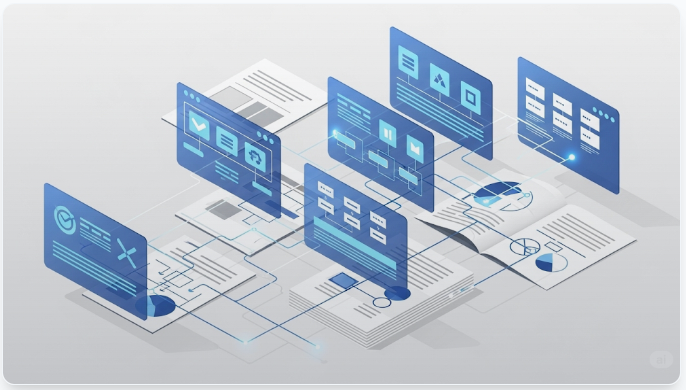
You’ve probably seen this pitch: “Model has a 1M token context window. Just dump your entire document in and ask questions.”
Sounds convenient. For a 200-page legal contract, that’s roughly 150,000 tokens. Well within capacity. Load it once, ask anything.
I tried it. Here’s what actually happened.
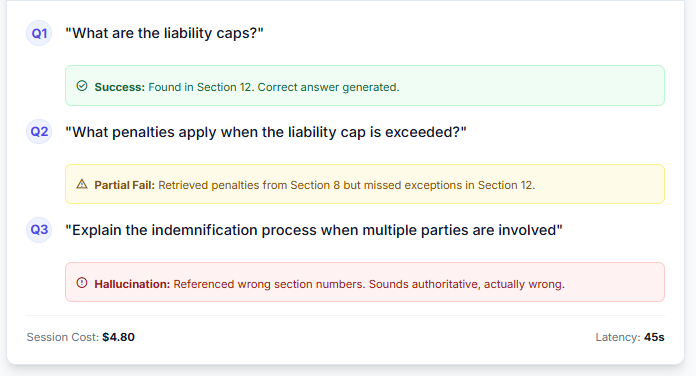
Cost for this session: $4.80 in API calls. Three questions. Two failures.
The context window was large enough. The problem wasn’t capacity. It was how the context was being used.
This is the gap between context capacity and context intelligence. In 2026, models have unprecedented context windows. But having space doesn’t mean having answers. It just means the failure modes are more expensive.
The Misleading Promise of “Just Load Everything”
The promise is seductive: forget chunking, forget embeddings, forget retrieval. Load the entire document. Let the model figure it out.
For simple documents and straightforward questions, it works. For complex documents (legal contracts, medical records, policy manuals, technical specifications), it fails in predictable ways.
Failure Mode 1: Lost in the Middle
Research from Liu et al. demonstrates that LLMs exhibit a U-shaped attention curve. They’re excellent at information positioned at the start or end of context. They’re demonstrably worse at information buried in the middle.
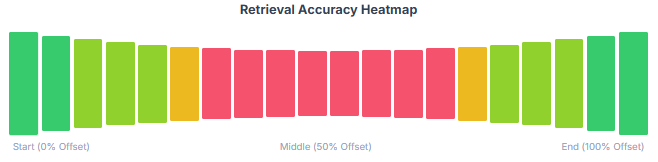
A 200-page contract has critical clauses scattered throughout. Liability caps in Section 12. Penalty definitions in Section 8. Exception clauses in Section 15. Force majeure in Section 3.
Loading all 200 pages means burying most of the relevant information somewhere in the middle 150,000 tokens. The model’s attention degrades. It misses connections. It hallucinates confident-sounding nonsense.
Failure Mode 2: Multi-Hop Reasoning Collapse
Consider this question: “What happens if the contractor violates the data retention policy during a force majeure event?”
The answer requires connecting three distinct sections:
- Force majeure definitions (Section 3)
- Data retention policy (Section 9)
- Violation penalties and exceptions (Section 11)
Even with all three sections loaded, the model struggles to traverse the logical chain. Why? Because each section is semantically distant from the others. “Force majeure” and “data retention” share no vector similarity. The model has the information. It can’t construct the reasoning path.
Failure Mode 3: Cost Explosion
Loading 150,000 tokens per query is expensive. Not just in API costs. In latency. In carbon footprint.
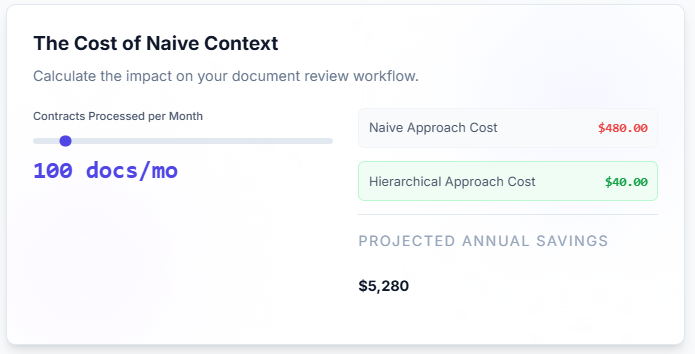
For a document review workflow where analysts ask 50-100 questions per contract, this becomes:
- API Cost: approximately $240-$480 per contract
- Latency: 15-30 seconds per query
- Waste: 95% of loaded tokens are irrelevant to each specific question
The model doesn’t need all 200 pages to answer “What are the liability caps?” It needs Section 12. Maybe Section 15 for exceptions. That’s 2,000 tokens, not 150,000.
Context capacity isn’t the constraint. Context curation is.
The False Choice: RAG vs. Long Context
Here’s where the conversation usually goes wrong.
Traditional response: “Fine, use embedding-based RAG instead.”
That’s not the answer either.
Traditional RAG (semantic similarity search over vector embeddings) solves the cost problem. It fails at the multi-hop reasoning problem. Worse, it introduces new failure modes: chunking artifacts, lost semantic connections, inability to traverse cross-references.
The real insight: this isn’t a binary choice.
In 2026, with models supporting 1M+ token windows, the question isn’t “RAG or long context?” It’s “how do we intelligently combine both?”
- Traditional RAG: Still excellent for semantic search over large document collections
- Long context: Powerful when you know exactly what to load and in what order
- Hybrid approach: Use hierarchical navigation to curate context, then load precisely what’s needed
The answer isn’t one or the other. It’s both, applied strategically.
Enter: Building Hierarchical Navigation
What if instead of choosing between “load everything” and “semantic search,” we built a system that navigates documents the way humans do?
When you read a legal contract, you don’t read all 200 pages linearly. You:
- Scan the table of contents
- Jump to relevant sections
- Follow cross-references when needed
- Zoom in on specific paragraphs
That’s hierarchical navigation. Start broad. Drill down. Follow connections.
The architecture I built implements this pattern through three core techniques. Each technique addresses a specific failure mode while working together to create an intelligent navigation system.
Technique 1: RAPTOR Tree Architecture
The foundation is a hierarchical structure that combines mechanical precision with semantic navigability, based on RAPTOR (Recursive Abstractive Processing for Tree-Organized Retrieval) principles.
Level 0: The Annotated Foundation
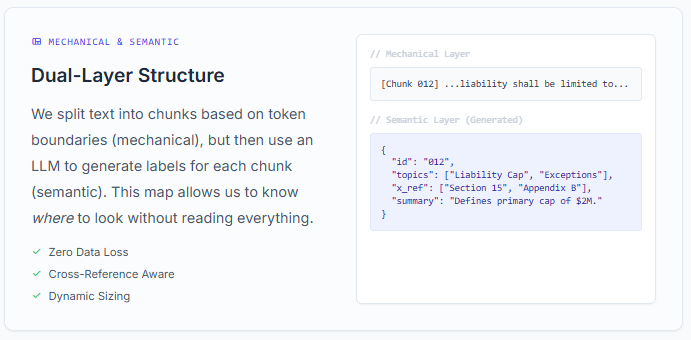
The base layer separates mechanical concerns from semantic concerns:
Mechanical Chunking:
- Text is split into chunks using token-based boundaries that respect sentence structure
- Zero data loss guarantee: every token belongs to exactly one chunk
- Chunk sizes adapt based on document length (500 tokens for medium docs, 1000 tokens for large)
Semantic Annotation:
- Each chunk receives an LLM-generated label describing its content
- Labels include: section title, key topics, cross-references, defined terms
Levels 1-N: Recursive Hierarchical Summaries
For large documents (100+ pages), the system builds upward through recursive summarization:
Level 0: [Raw Chunks - Full Document Content]
         ↓ (group 5 chunks, generate summary)
Level 1: [Section Summaries - ~20% of original]
         ↓ (group 5 summaries, generate higher summary)
Level 2: [Chapter Summaries - ~4% of original]
         ↓ (continue until convergence)
Level N: [Document Summary - Root Node]
This multi-level structure enables navigation at different granularities. Broad questions (“What are the main risk categories?”) start at higher levels. Specific questions (“What is the exact penalty in Section 8.2?”) drill down to Level 0 chunks.
Why This Matters:
Traditional RAG relies on semantic embeddings that can’t capture structural relationships. Naive long context loading drowns the model in irrelevant information. The RAPTOR tree provides navigable entry points at multiple abstraction levels while guaranteeing complete data coverage at the foundation.
The router can start broad, drill down selectively, and always retrieve complete, unbroken content blocks.
Technique 2: Hierarchical Routing with Scratchpad
Navigation happens in multiple passes, with explicit reasoning at each depth.
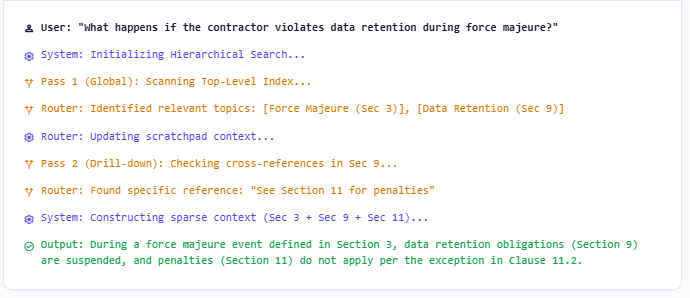
Pass 1: High-Level Navigation
- Router examines document-level semantic labels
- Updates scratchpad: “Looking for liability caps. Sections 12 and 15 are relevant because…”
- Selects top-level sections
Pass 2: Section-Level Drilling
- Router examines labels within selected sections
- Updates scratchpad: “Section 12 defines caps. Section 15 has exceptions. Need both.”
- Selects specific subsections
Pass 3: Paragraph-Level Precision
- Dynamically sub-splits large chunks into paragraph-level granularity
- Updates scratchpad: “Exception clause in 15.3.2 modifies the cap in 12.1”
- Returns precise paragraphs with full context
The scratchpad mechanism is critical. It creates an auditable reasoning trace. When the system makes a mistake, you can see where the navigation went wrong. When it succeeds, you can verify the logical path.
This solves the multi-hop problem. The router doesn’t rely on semantic similarity alone. It follows explicit cross-references and builds reasoning chains across sections.
Technique 3: Cache-Augmented Generation
Smart navigation is worthless if it’s too expensive to use.
The architecture leverages Cache-Augmented Generation (CAG), a pattern that structures prompts to maximize cache hit rates across repeated queries. By separating static document context from dynamic query specific content, the system achieves dramatic cost reductions.
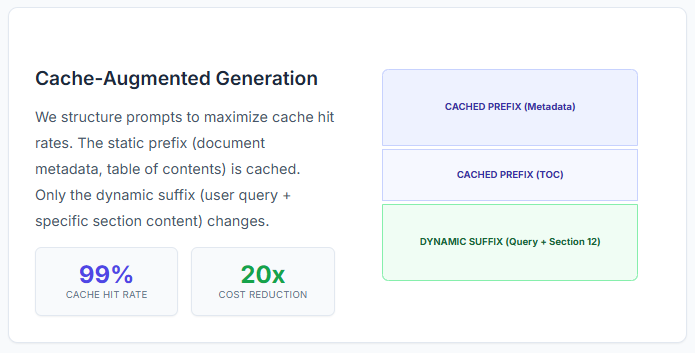
Static Prefix (Cached):
- Document metadata
- Full table of contents with semantic labels
- System instructions
Dynamic Suffix (Not Cached):
- User query
- Scratchpad reasoning history
- Selected section content
Cache hit rates on production workloads: 80-99%
For a typical document review session:
- First query: 150,000 tokens processed (full document metadata cached)
- Subsequent queries: 5,000-10,000 tokens processed (cache hit on metadata, only new sections loaded)
This reduces per-query cost by 10-20x compared to naive full-document loading.
The result: hierarchical navigation becomes economically viable for production workloads.
Real-World Impact: What Actually Changes
Before (Naive Long Context):
- Load 150,000 tokens per query
- Cost: $3-5 per query
- Accuracy: 60-70% on multi-hop questions
- Latency: 20-30 seconds
After (Hierarchical Navigation):
- Load 5,000-15,000 tokens per query
- Cost: $0.20-0.60 per query (90% reduction)
- Accuracy: 85-95% on multi-hop questions
- Latency: 3-5 seconds
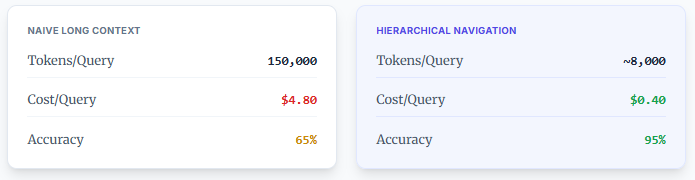
This isn’t theoretical. These are metrics from document review workflows processing legal contracts, medical records, and policy documents.
The accuracy improvement comes from precision. The model sees exactly what it needs. Nothing more. Nothing less.
The cost reduction comes from curation. Cache hits on document metadata. Selective loading of relevant sections.
The latency improvement comes from focus. Smaller contexts process faster.
When to Use What: A Decision Framework
This isn’t a universal solution. Different problems need different approaches.
Use Traditional RAG when:
- Searching across large document collections (hundreds or thousands of documents)
- Questions are semantically diverse and unpredictable
- Documents are relatively uniform in structure
- Cost per query must be minimal (<$0.01)
Use Naive Long Context when:
- Documents are short (<10,000 tokens)
- Questions are simple and fact-based
- Latency doesn’t matter
- You’re doing exploratory analysis, not production workflows
Use Hierarchical Navigation when:
- Documents are complex and structured (legal, medical, technical)
- Questions require multi-hop reasoning or cross-reference traversal
- Accuracy matters more than raw speed
- Cost and latency must be balanced for production scale
The key insight: context capacity enables new techniques, but doesn’t replace systematic architecture.
The Architecture Gap
We’re at a moment where model capabilities have outpaced architectural thinking.
Models have 1M+ token windows. Developers treat this as “problem solved.” It’s not. It’s an opportunity to build better systems.
The gap isn’t intelligence. It’s engineering discipline.
Every complex document you’ve analyzed, every legal review workflow you’ve built, every medical record analysis pipeline you’ve deployed that accumulated expertise about how to navigate documents efficiently, what context actually matters, how to verify answers that’s the value.
Hierarchical navigation doesn’t make models smarter. It makes them predictable. And in production systems where you’re handling legal liability, medical decisions, or regulatory compliance, predictability beats raw capability every time.
What Comes Next
Build navigation systems, not just retrieval systems. Version them. Make them auditable. Let domain experts refine the routing logic.
The models will keep getting bigger context windows. That doesn’t eliminate the need for intelligent architecture. It amplifies it.
Larger context windows create opportunity. Intelligent architecture captures value. Build for both.
Resources & Next Steps
- GitHub Repository: Hierarchical Navigation
- Full Architecture Documentation: TECH-ARCHITECTURE.md
- Interactive AI Knowledge Base: Explore & Chat with the Codebase